


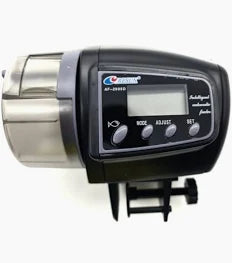
Resun Auto Feeder AF2005D
Resun Auto Feeder AF2005D
Product Description
Product Description
Resun AF-2005D (and comparison with the AF-2009D you asked about earlier)Both models are very similar digital automatic aquarium fish feeders from Resun. They use the same programming logic and core features, but differ slightly in size and capacity.Side-by-Side Comparison
Key similarities: Both are battery-powered, have a moisture-resistant design, manual feed button, and programmable LCD timer. The AF-2005D is basically the bigger-capacity version of the AF-2009D.Detailed Programming Instructions (Same for Both Models)
|
Feature
|
AF-2009D
|
AF-2005D
|
|---|---|---|
|
Size
|
Approx. 11 × 10 × 7 cm
|
Approx. 14–15 × 8–12 × 9–15.6 cm
|
|
Food Capacity
|
~65 ml
|
~100 ml (larger drum)
|
|
Power
|
2 × AAA batteries
|
2 × AA batteries
|
|
Feeding Times
|
Up to 4 per day
|
Up to 4 per day
|
|
Portion Control
|
1 or 2 drum rotations
|
1 or 2 drum rotations (double-feed option available)
|
|
Display
|
LCD with clock + "Lo" low battery
|
LCD with clock + "Lo" low battery
|
|
Food Types
|
Dry flakes, pellets, granules
|
Dry flakes, pellets, granules
|
|
Mounting
|
Clip-on rim or double-sided tape
|
Clip-on rim or double-sided tape
|
|
Other
|
Compact design
|
Larger capacity, slightly bigger body
|
-
Set the Current Time (Clock Mode)
- The colon (:) flashes in clock mode.
- Press SET → use ADJUST to change the hour.
- Press MODE → use ADJUST to change the minute.
- Press SET to save.
-
Set Feeding Times (up to 4 slots)
- Press MODE to cycle through the 4 feeding time slots (or back to clock).
- In a feeding slot: Press SET → adjust hour with ADJUST.
- Press MODE → adjust minute with ADJUST.
- Press MODE again → use ADJUST to choose 1 rotation, 2 rotations, or no feeding (arrow indicator).
- Press SET to save that slot.
- Repeat for other feeding times.
-
Manual Feeding
- Press the manual button (usually marked with a fish icon) to dispense one rotation immediately.
Regular price
R 475.00
Regular price
R 475.00
Sale price
Unit price
per
Low stock: 2 left
Couldn't load pickup availability

What Does ''Available To Order'' Mean?

What Does ''Available To Order'' Mean?
“Available to order” means this item is not in store right now. It can be ordered and delivered within 5–7 working days. Please confirm availability before you order.
Coastal Pets Store Provides Top Quality Products
Coastal Pets Provides Top Quality Products
Coastal Pets Provides Top Quality Products
Coastal Pets Provides Top Quality Products
Coastal Pets Provides Top Quality Products
Coastal Pets Provides Top Quality Products
Coastal Pets Provides Top Quality Products